


How are you doing folks? Welcome to the first edition of Case.#
This editorial will be dedicated to showcase projects and portfolio of our creatives. I shall kickstart it with the last project I delivered to Europe.
You can check the original Case Study at Contra.com (That’s also where you can hire me for a project.)
Let’s buzz!
0. Introduction
Baseline: Sports Companion Design System
Client: Procimo Tech (Portugal / Brazil)
Role: Lead Product Designer
Studio: Sentient (sentient.net.br)
Deliverables: 127 Wireframes, 127 Unique Screens, 233 State Variants, 82 Design Tokens
Duration: 4 weeks, fixed scope
Platform: iOS + Android (React Native)
Year: 2026
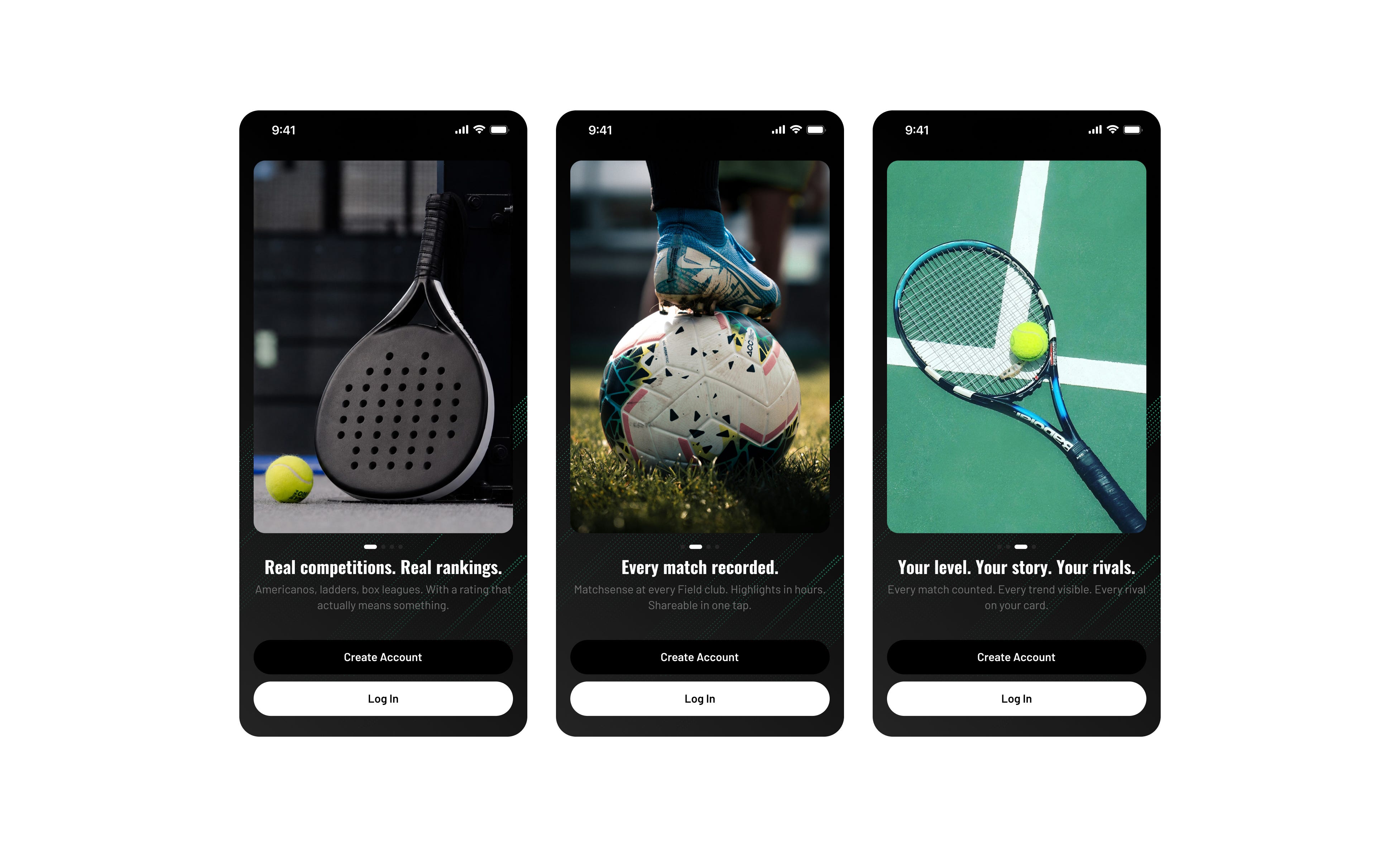
Field is a sports platform for racquet sports clubs across Portugal and Brazil. It started as a booking tool - reserve a court, pay, show up. But the product vision had outgrown the booking-app shell. Field wanted to become the place where athletes live their sports life: competitions, video highlights, Glicko-based skill ratings, rivalries, streaks, and a persistent athletic identity.
The brief arrived as a 118-page product specification covering vision, three personas, twelve locked product decisions, full information architecture, thirteen user flows, per-screen acceptance criteria, and a complete English content sheet. The scope: approximately 80 unique screens spanning authentication, onboarding, an identity-first Home, three play modes (Compete, Book, Academy), a native video surface, an Account hub with stats, wallet, Field Pass memberships, and a full global error/empty system. iOS and Android, simultaneous launch, four weeks.
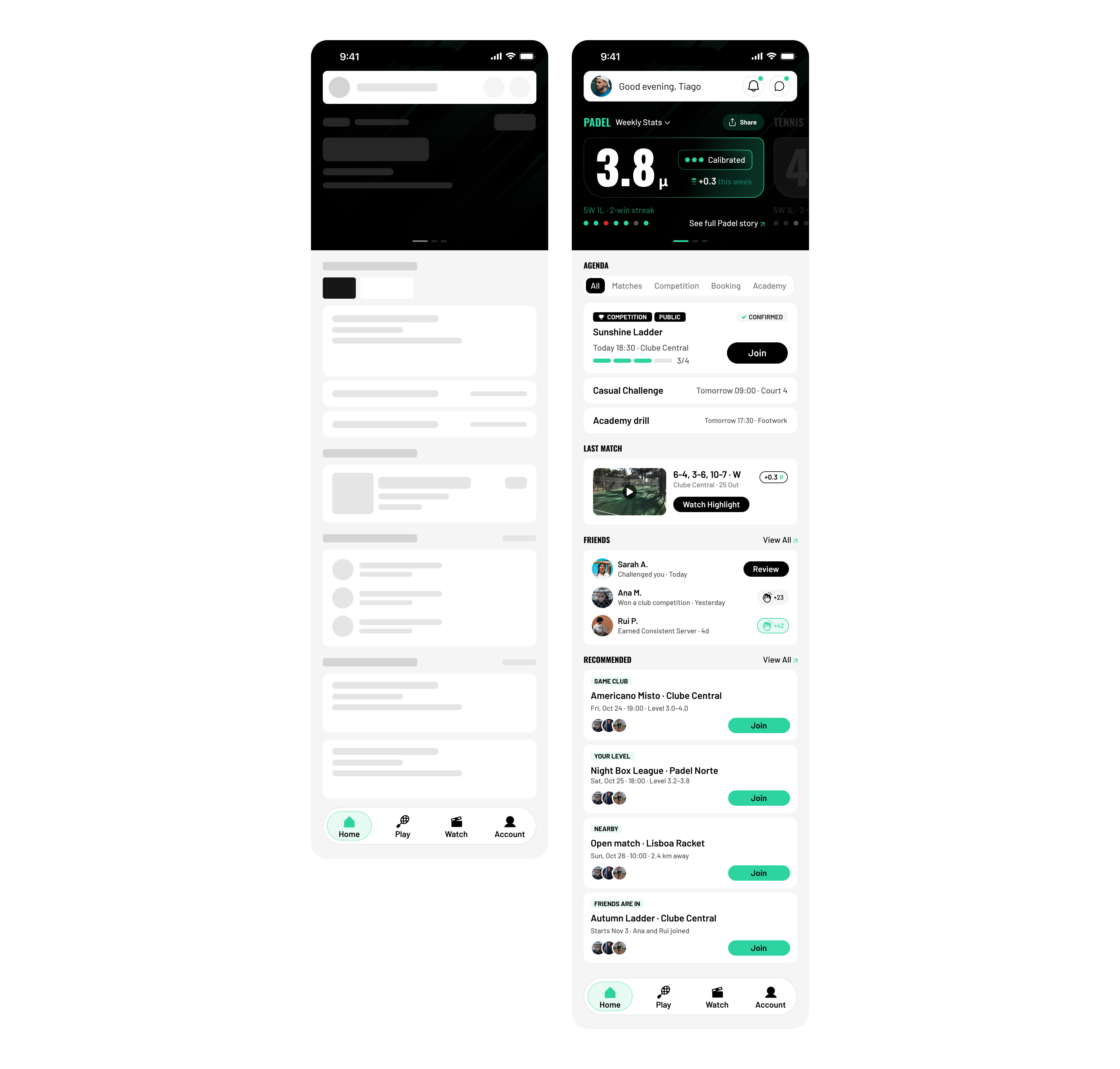
The core tension: Field needed to feel like Whoop meets Strava for racquet sports - dark, data-dense, identity-forward - while still handling the practical complexity of court bookings, split payments, tournament brackets, and club management. Every other booking app opens on “Find a match.” Field needed to open on “Here’s who you are this week.”
The design system had to serve both moods - the emotional, dark athletic surfaces where your rating and streak live, and the functional, light discovery surfaces where you browse courts and pay. Not a theme toggle. A deliberate per-surface strategy where dark means identity and light means utility.
0.1 Design Philosophy
Baseline is governed by seven core principles. Each one is a constraint that generates clarity, not a mood board aspiration.
Restrained by design. Two type families. One accent color. A disciplined grayscale. Color exists only to communicate meaning. Mint represents progress, amber signals caution, and red demands attention. Nothing decorates. Everything communicates.
Dark-first confidence. The emotional surfaces of the product — performance, rivalries, rankings, achievements, and live competition — live on ink. Dark is not a theme toggle. It is the default voice for moments that shape athletic identity. Light surfaces are reserved for utilitarian tasks: onboarding, directories, general navigation, forms, settings, payments, and account management.
Complete by Design. Baseline defines every meaningful interaction before development begins. Success states, loading, validation, empty screens, failures, and edge cases are treated as first-class experiences, not future tasks. The result is a system that reduces ambiguity, accelerates implementation, and delivers consistent experiences across every screen.
Data as identity. Numbers are never ornamental. Ratings, rankings, streaks, cashback, and statistics define the experience because they define the athlete. Data is not layered onto the interface. It is the interface.
Density without clutter. Baseline embraces information-rich interfaces without sacrificing clarity. Generous spacing defines the layout, while related data is grouped tightly enough for rapid scanning. The interface breathes where users pause and compresses where they move quickly.
Athletic Career Companion. Sport is a journey, not a single match. Baseline supports every stage of an athlete’s progression — from discovering a new sport and booking a first court to competing in tournaments, climbing rankings, and reaching higher levels of performance. Every interaction contributes to a persistent athletic profile.
Built for modern sports ecosystems. From court bookings and memberships to rankings, tournaments, coaching, performance tracking, wallets, and social experiences, Baseline provides a unified foundation that connects every touchpoint into one coherent product experience.
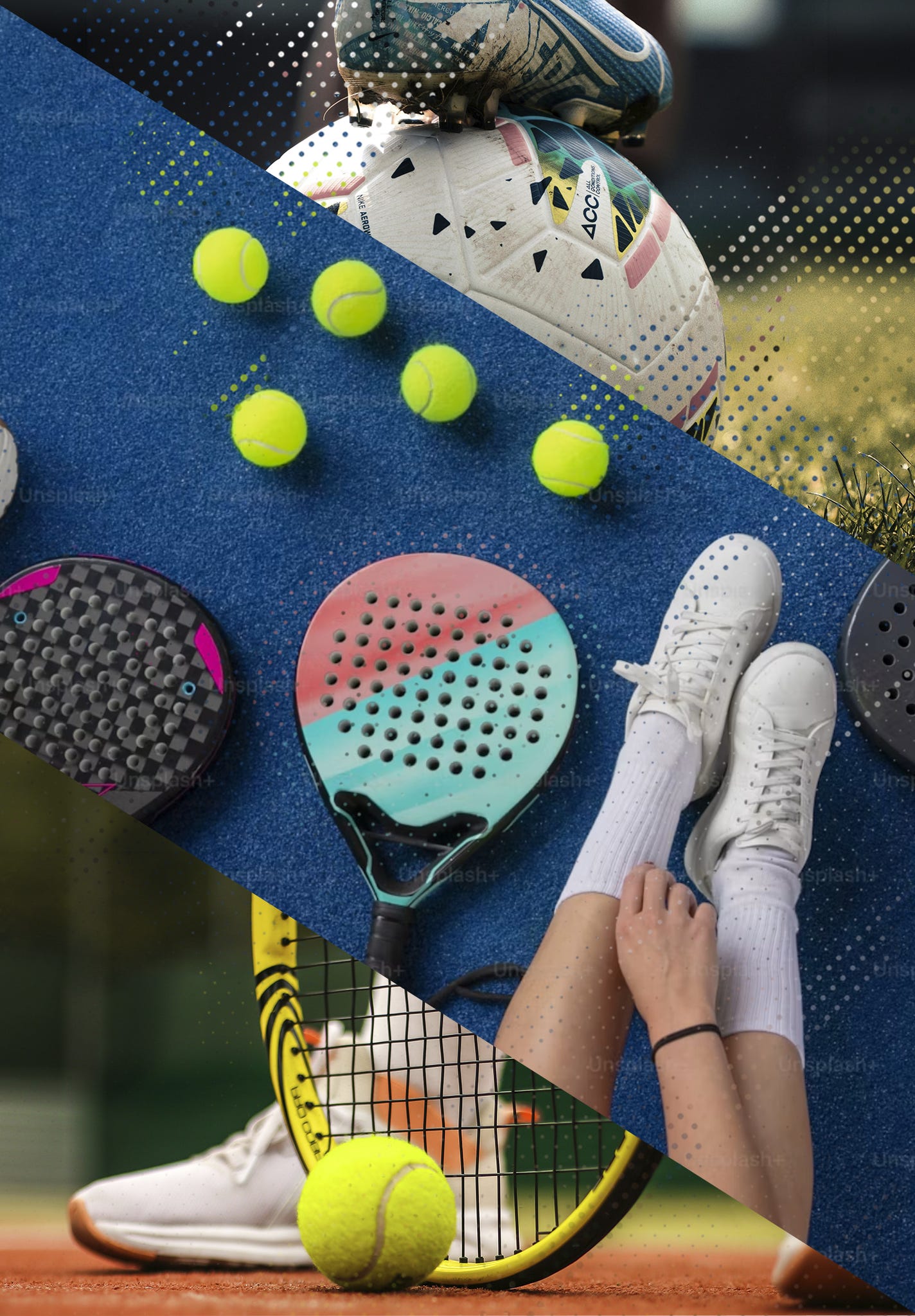
0.2 Visual Identity
Typography
Two families carry the entire system. Oswald (Bold, condensed grotesque) handles headlines, display numerics, stat readouts, and athletic identity moments — it reads like a sports magazine, not a SaaS dashboard. Barlow (Regular, Medium, SemiBold, Bold) handles body text, labels, captions, and inline numerics with tabular figures for alignment. The pairing is deliberate: Oswald announces, Barlow explains.
The type scale spans seven production styles from Display (Oswald Bold 56/60) down to Micro (Barlow Medium 11/14), each bound to a Figma text style with leadingTrim: CAP_HEIGHT for tight, intentional vertical rhythm.
Color
The palette is surgically restrained:
Token | Hex | Role
Mint (primary) | #2DD4A0 Progress, success, brand accent, CTAs
Ink (base black) | #000000 Dark surfaces, primary text on light
Mist | #F5F5F5 Light page backgrounds
White | #FFFFFF Cards, elevated surfaces
Grey scale | 9 steps (200–900) Borders, secondary text, disabled states
Amber | Semantic Caution, warnings, pending states
Red | Semantic Live matches, errors, negative deltas
Mint reads as confident sports-tech - Whoop / Robinhood territory, not generic SaaS green. The full 9-step mint tonal scale (50–999) provides enough range for dark-surface tints (mint/999 for score box backgrounds) through light-surface accents (mint/400 for CTAs and progress indicators).
Token Architecture
82 design tokens organized across three Figma variable collections:
Field Colors — primitive color scale (mint, grey, ink, white)
Field / Color — semantic tokens with Light/Dark mode aliases (surface/card, border/divider, text/primary, icon/primary)
Dimensions — radius and spacing tokens (radius/card=12, radius/full=999, five-tier spacing scale from 4px to 24px)
Semantic tokens alias primitives, never duplicate hex values. Every fill, stroke, and text color in production is bound to a variable — no raw hex anywhere in the delivered file.
Dark-First Confidence
Dark is not a setting. It is Field’s identity.
The design system assigns surface mode by purpose, not by OS preference. There is no user-facing toggle in v1. Instead, every surface earns its mode:
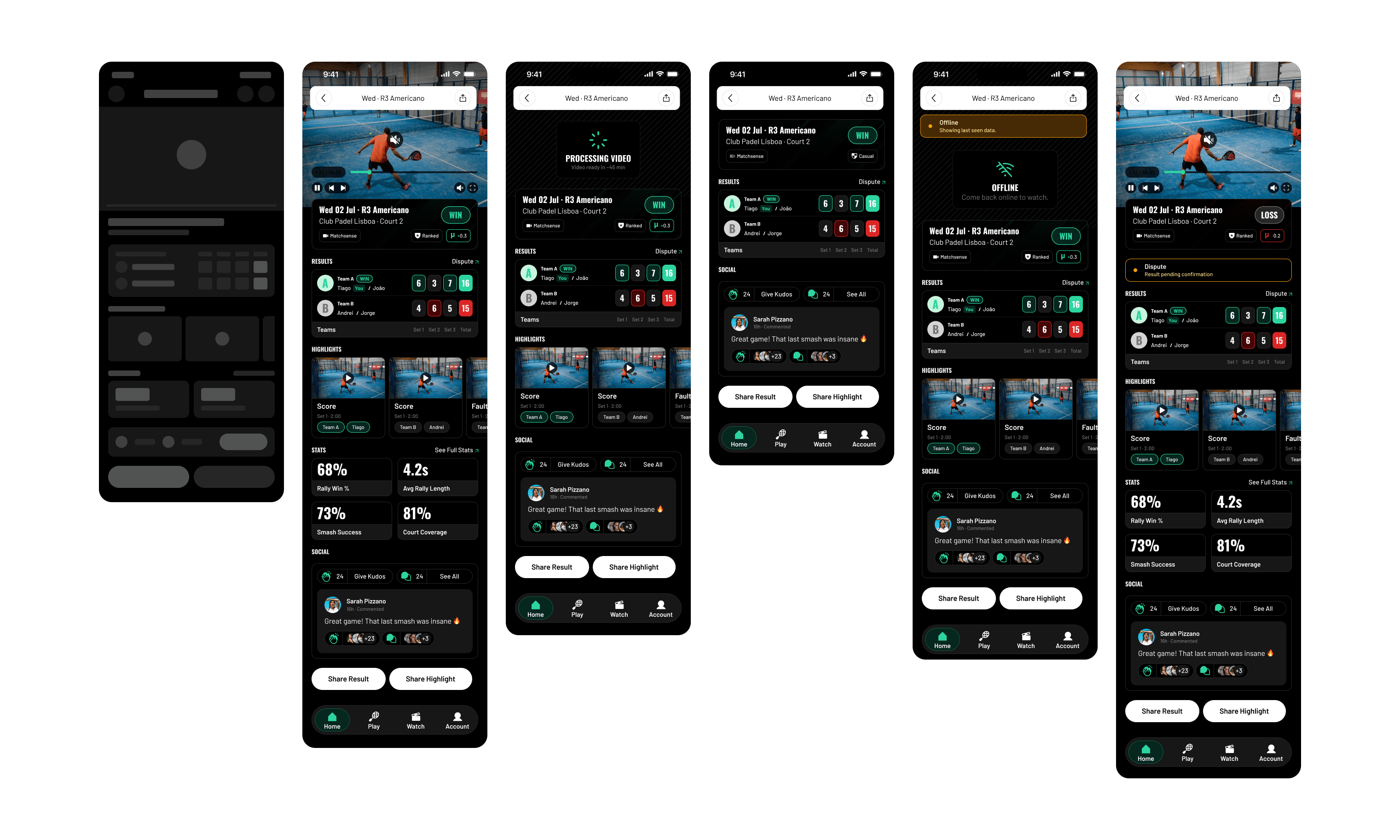
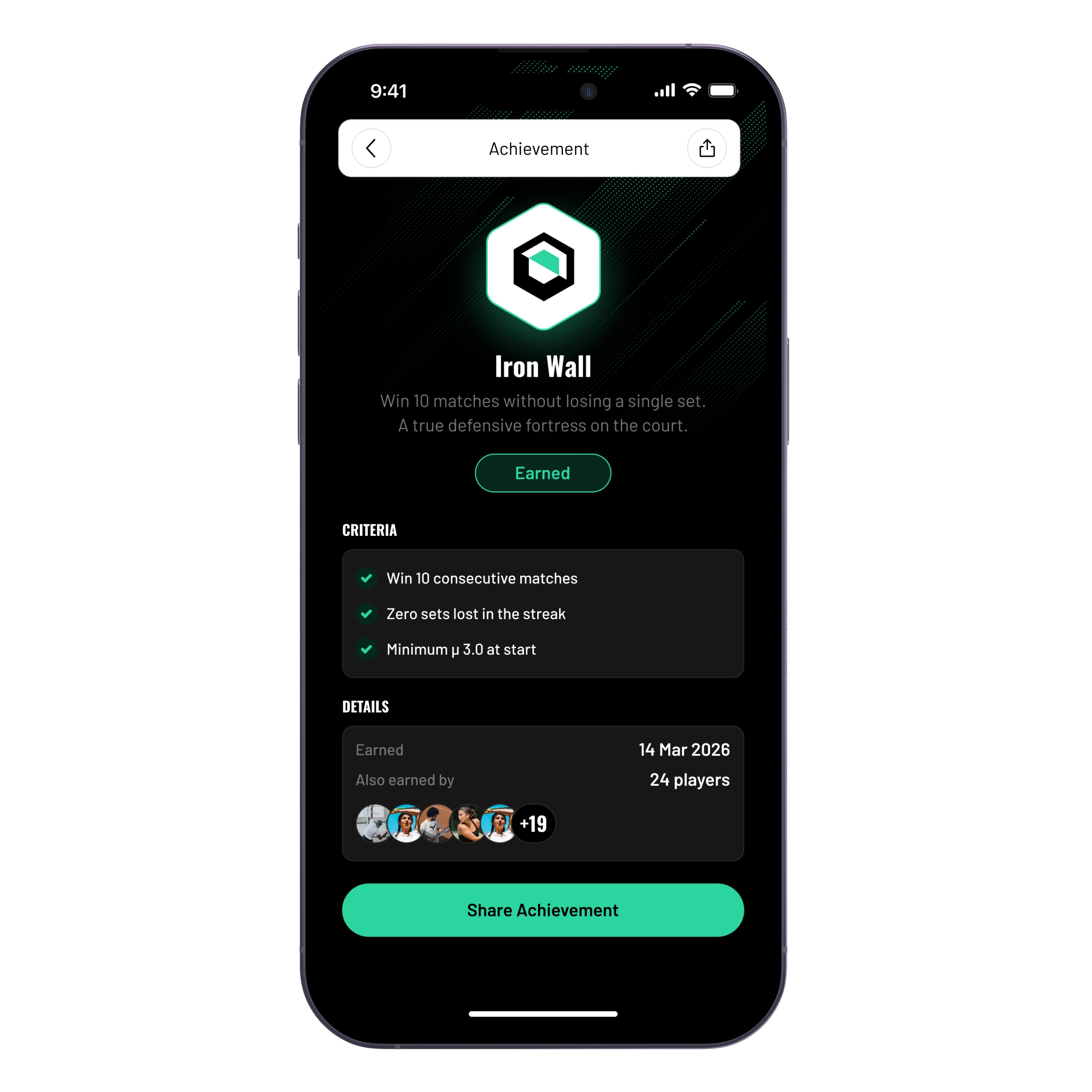
Dark surfaces dominate where it matters most — the Home identity hero card, all competition LIVE screens, the Watch video tab, stats deep-dives, achievements, match results, score entry, and streak detail. These are the moments that shape who the athlete is. The dark ink background recedes, letting mint accents, white typography, and data visualizations command attention.
The dark design language uses flat ink as the default, with a mint-textured background (grey/900 base + texture overlay) reserved for immersive highlight surfaces like H2 Identity Card Expanded and H12 Streak Detail. Utilitarian dark screens (PC3, PC9, M2) stay flat — the texture is earned, not default.
Light surfaces appear where they serve a practical purpose — discovery feeds, booking flows, club browsing, social feeds, forms, account management, settings, and payments. Light surfaces use mist (#F5F5F5) page backgrounds with white elevated cards, ink text, and grey secondaries. They are efficient and scannable, designed to get out of the way.
The two modes share identical spacing, component architecture, and interaction patterns. A card on a dark screen and a card on a light screen use the same 12px horizontal / 16px vertical padding, the same radius/card=12 corners, the same gap-sm=8 row spacing. Only the fills and text colors change — through semantic variable aliases, not manual overrides.
0.3 The System at Scale
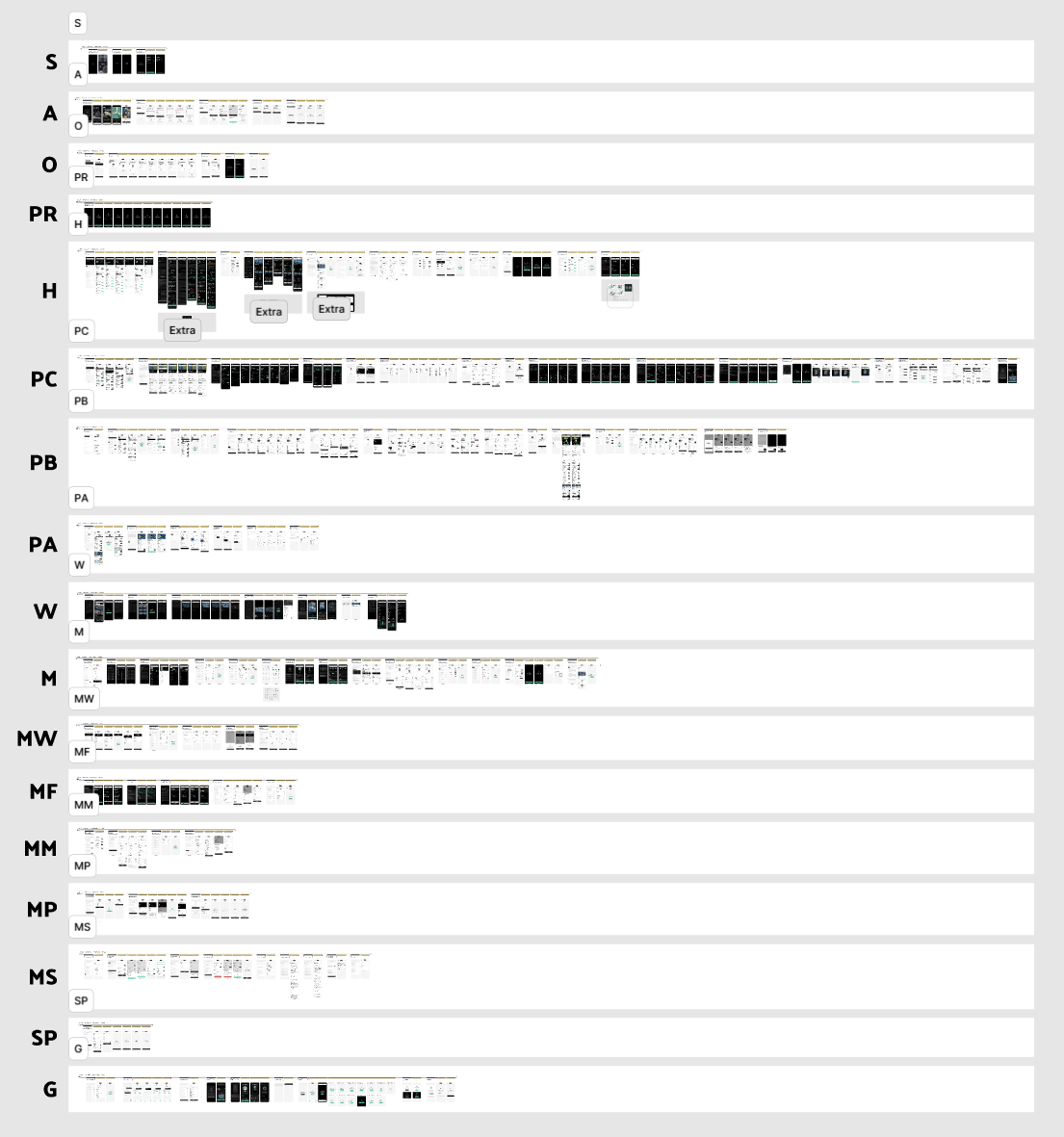
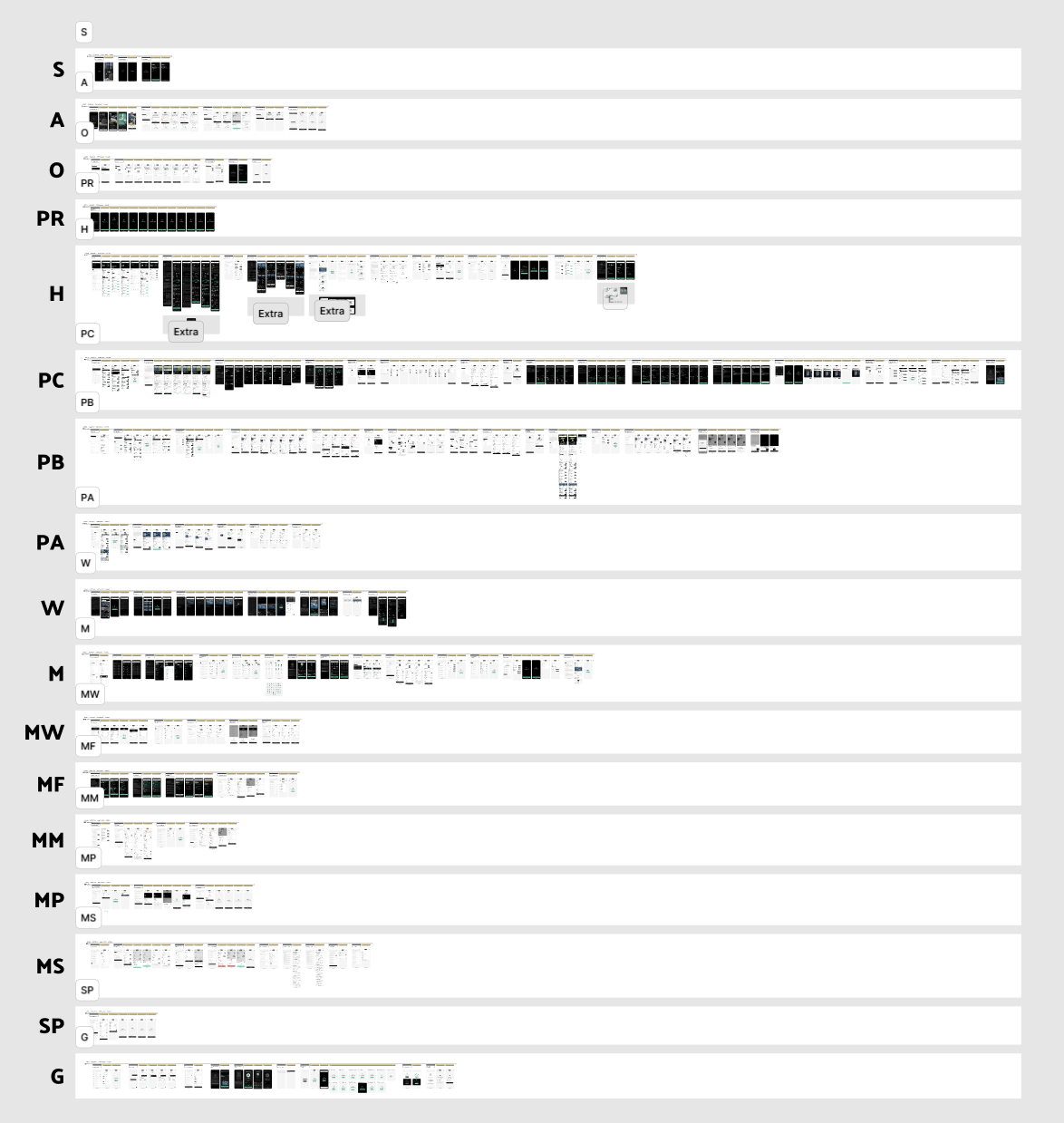
Baseline shipped as a production Figma file with 493 screen roots organized across a structured Workbench and a complete Handoff page, all delivered within 1 month of work. The numbers from the Presentation Sheet tell the story of scope:
Wireframes - 127 Every screen began as an implementation-oriented compact spec defining anatomy, content zones, and state behavior before any visual design
Unique Screens - 127 Production hi-fi Matrix screens - the origin from which all state variants derive
State Variants - 233 Loading, empty, error, offline, domain-specific, and edge-case states treated as first-class deliverables
Design Tokens - 82 Variables across three collections (colors, semantic aliases, dimensions) ensuring zero raw hex in production
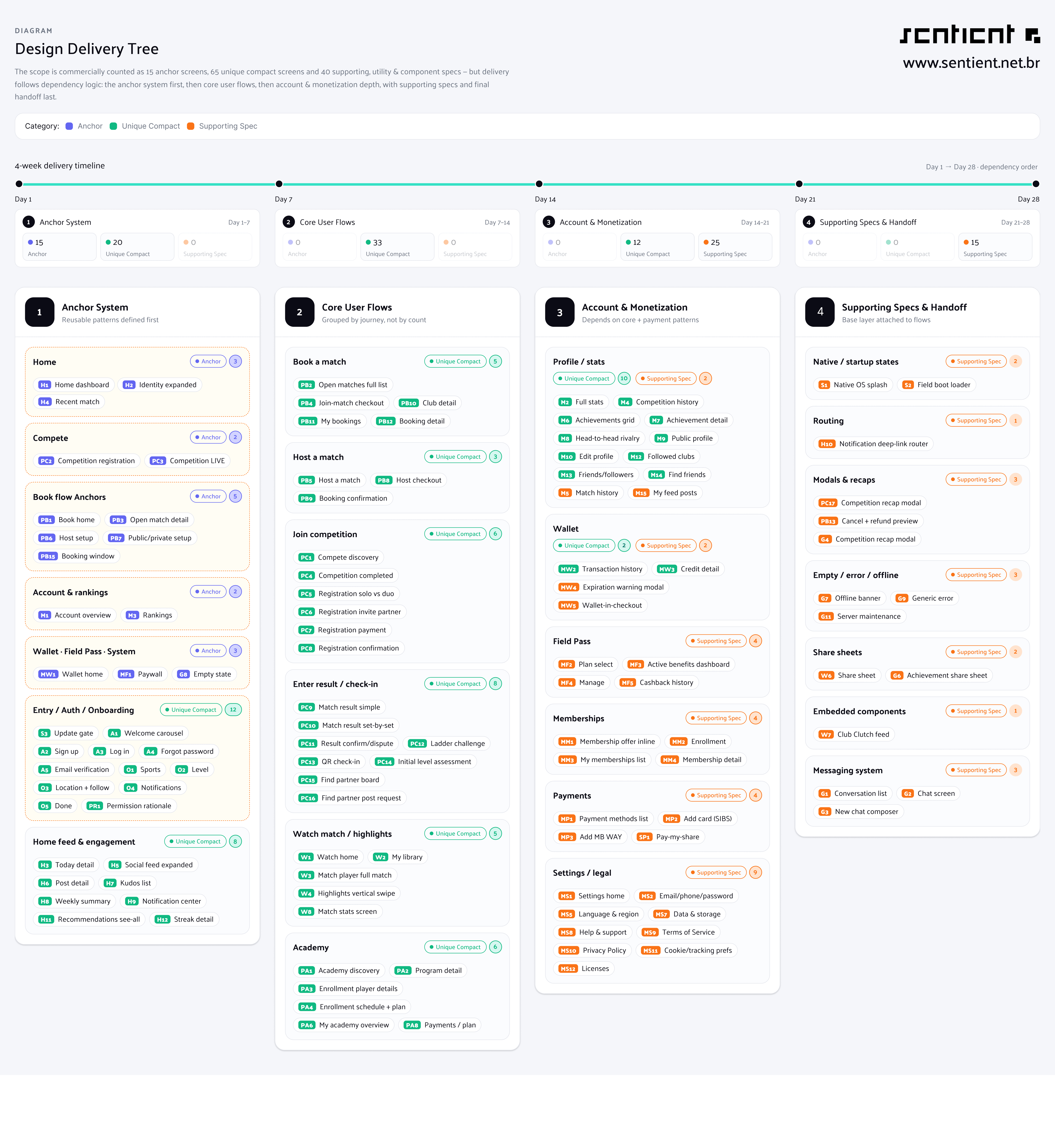
The contractual scope was 120 documented deliverables:
15 Anchor Screens — the foundational screens that establish visual tone, interaction patterns, and the component language for the entire product (H1, H2, H4, PC2, PC3, PB1, PB3, PB6, PB7, PB15, M1, M3, MW1, MF1, G8)
65 Unique Compact Screens — the remaining screens across authentication, onboarding, compete, book, academy, watch, account, and wallet flows
40 Supporting Specs — utility screens, state variants, modals, templates, embedded components, permission variants, startup/loading states, checkout utilities, share sheets, legal views, and global error states
Screen families span 15 categories: H (Home/Feed/Engagement), PC (Compete), PB (Book), PA (Academy), W (Watch), M (Account/Profile), MW (Wallet), MF (Field Pass), MM (Memberships), MP (Payments), MS (Settings), S (System), A (Auth), O (Onboarding), PR (Permissions), G (Global), and SP (Split Payment).
0.4 Process & Workflow
The Sprint Structure
The project ran as a 4-week fixed-scope engagement with a phased delivery model:
Phase | Timeline | Deliverables | Focus
1 - Anchor System | Days 1–7 | 35 Deliverables The 15 foundational screens + all their state variants. Establish visual tone, interaction patterns, component language
2 - Core User Flows | Days 7–14 | 33 Deliverables Competition, booking, academy, and watch flows built on the anchor system
3 - Account & Monetization | Days 14–21 | 37 Deliverables Profile, stats, wallet, Field Pass, memberships, settings, payments
4 - Supporting Specs & Handoff | Days 21–28 | 15 Deliverables Global states, permission variants, handoff annotations, dev-mode prep
The Brief-First Method
Every design decision traces back to the 118-page Designer Brief. The brief specifies per-screen acceptance criteria, content sheet with verbatim copy, thirteen user flows, and twelve locked product decisions. The rule: if you’re inventing something that isn’t in the brief, stop. Either it’s already specified (look harder) or it’s a decision that needs to be made (ask, get an answer within 24 hours, document it).
AI-Augmented Design Production
Baseline pioneered a novel workflow: AI-assisted design implementation at production quality through the Figma MCP (Model Context Protocol). The process:
Compact spec wireframes defined anatomy, content zones, and state behavior for every screen
AI agents implemented screens in Figma directly — creating frames, binding variables to tokens, instancing components, applying text styles, and placing content according to the brief
Screenshot-driven verification after every build step — each screen rendered and compared against the spec
Structure gates verified correct section placement, parent-child relationships, variable bindings, and clipsContent flags
Human review refined composition, visual weight, and design judgment that no automation can replace
The result: a single designer delivered 493 production screen roots in 4 weeks - a throughput that would typically require a team of 3–4 designers working in parallel. The AI handled the mechanical precision (token binding, component instancing, spacing enforcement); the designer handled the creative decisions (visual hierarchy, information density, emotional tone).
Session Continuity
Every working session produced a dated Session Handoff document carrying forward open flags, next steps, and current canvas state. Durable rules and API patterns accumulated in a living AGENTS.md file (350+ lines of Figma-specific gotchas and conventions). This system ensured zero context loss between sessions — any session could pick up exactly where the last one left off.
0.5 Results & Impact
What Shipped
• 493 production screen roots across a structured Workbench and complete Handoff page
• 127 unique Matrix screens — each the origin for its family of state variants
• 233 state variants covering loading, empty, error, offline, and domain-specific conditions
• 82 design tokens across three variable collections with zero raw hex in the production file
• 120/120 contractual deliverables mapped on the Handoff page with full dev-mode readiness
• 15 screen families spanning the complete product surface from authentication to split payments
• All screens tokenized — every fill/stroke bound to variables, every text node bound to text styles
• Both platforms covered — iOS primary (iPhone 16 Pro 402x874) with Android mirror patterns
Design System Quality
The delivered Figma file is not a collection of static mockups. It is a functioning design system:
Semantic tokens alias primitives through proper variable architecture — light/dark mode switching works through aliases, not manual overrides
Components use few-variants-many-properties architecture for maintainability
The five-tier spacing scale (4/8/12/16/20px) bound to dimension tokens ensures consistency across 493 screens
Card padding rule (12px horizontal, 16px vertical) applied universally through token binding
Icon system (Phosphor, 24x24 frame, 1.5 stroke) with proper resize/rescale patterns
The Three Tests
Every screen in Baseline passes the brief’s own acceptance criteria:
The Slicker test — Would a user of any other racquet-booking app say “this is slicker than mine” within 3 seconds?
The Strava test — Does this feel like an athlete’s app, not a booking app?
The Whoop test — Does this surface tell me something about me, or just show me data? Suggested Image A closing hero image: a single device mockup showing H1 Home at an angle on a dark background, with the key project stats floating beside it as mint-colored data points (127 screens, 233 states, 82 tokens, 4 weeks, 1 designer). Clean, confident, final. Alternatively, a triptych of the three “test” moments: the slicker-than-competitors reaction, the athlete-identity feeling, the personal-data connection — each represented by the screen that best delivers it.
0.5 Credits & Tools
Signature Designer: Thiago Patriota
Studio: Sentient (sentient.net.br)
Client: Field / Procimo Tech (Portugal) / Guilherme Fontes
Location: Made in Brazil, with unreasonable care.
Tools:
Figma (production design, components, variables, dev-mode handoff)
Figma MCP (AI-assisted design implementation via Model Context Protocol)
Claude Code (AI design agent orchestration, session continuity, brief analysis)
Phosphor Icons (icon system, 1.5 stroke weight)
Google Fonts (Oswald + Barlow)

About the Author
Thiago Patriota

Made in 1996. Born & Raised Brazillian. Bachelor’s Degree in Advertising and Communication. Senior UX/UI Designer, Adept to autodidactism. Curious Soul. Published Author. Founder of Sentient. Co-founder of Agency Brasil.
Hire me at Contra